

Launching a new website brings excitement mixed with frustration. You’ve invested time, money, and creative energy building something valuable, only to discover that search engines seem oblivious to your existence. Days turn into weeks with no organic traffic, no search visibility, and no indication that Google even knows your site exists. This waiting period can feel excruciating, especially when competitors appear prominently for the exact keywords you’re targeting.
The reality is that search engines don’t automatically discover new websites the moment they go live. Without deliberate action, your site might languish in obscurity for weeks or even months before search engine crawlers stumble upon it through external links or other discovery mechanisms. During this invisible period, you’re missing potential customers, building no search presence, and allowing competitors to solidify their advantages.
A search engine jumpstart addresses this problem through strategic actions that accelerate discovery and indexing. Rather than passively waiting for search engines to eventually find your site, you proactively signal your existence, submit your pages directly, create external references, and optimize technical elements that facilitate rapid crawling. These techniques don’t manipulate rankings or employ questionable tactics—they simply help search engines efficiently discover and evaluate content they would eventually find anyway.
This comprehensive guide reveals proven strategies for getting indexed quickly without compromising long-term SEO health. You’ll learn essential pre-launch preparations, immediate post-launch actions, technical optimizations that signal crawl priority, and monitoring techniques that confirm your jumpstart succeeded. Whether you’re launching an e-commerce store, starting a blog, or establishing a local business presence, these tactics will dramatically reduce the time between launch and meaningful search visibility.
Understanding Search Engine Indexing
How search engines discover new websites involves multiple pathways. The most common natural discovery method occurs when crawlers follow links from already-indexed sites to your pages. If an established website links to your new site, search engine bots following links on that site will eventually discover yours. However, this process can take considerable time, particularly if you haven’t yet built any backlinks or if those links exist on pages that crawlers visit infrequently.
The crawling and indexing process operates in distinct stages. First, search engines must discover that a URL exists through links, sitemaps, or direct submissions. Once discovered, crawlers retrieve the page content, analyzing HTML, images, CSS, JavaScript, and other resources. After crawling, sophisticated algorithms evaluate content quality, determine relevance for potential queries, and decide whether pages merit inclusion in the search index. Finally, indexed pages become eligible to appear in search results when their content matches user queries.
Why new sites aren’t automatically indexed stems from the sheer scale of the internet. Billions of web pages compete for crawler attention, and search engines must allocate crawling resources strategically. Established sites with proven track records of fresh, valuable content receive frequent crawling, while completely new sites start with minimal crawl budget allocation. Search engines essentially adopt a “trust but verify” approach—they’ll evaluate your content once they discover it, but they don’t proactively seek out every new domain the moment it launches.
Typical timeline for organic discovery varies dramatically based on circumstances. A new site with no backlinks and no manual submissions might wait 4-8 weeks before search engines naturally discover it. Sites with immediate backlinks from quality sources can see indexing within days. Sites actively using submission tools and creating external signals often achieve indexing within 24-72 hours. Understanding this timeline helps set realistic expectations while highlighting why proactive jumpstart strategies matter.
Factors that slow down indexing include technical problems like robots.txt misconfiguration blocking crawlers, noindex tags accidentally left from development, extremely slow page load speeds that make crawling resource-intensive, thin or low-quality content that doesn’t merit indexing priority, and lack of any external signals indicating the site matters to users. Identifying and eliminating these barriers forms a critical part of effective jumpstart strategy.
Pre-Launch Preparation for Fast Indexing
Technical Foundation
Proper site structure and navigation create the foundation that enables efficient crawling. Search engine bots should easily understand your site hierarchy, with clear pathways from your homepage to all important content. Flat site architectures where all pages are accessible within three clicks from the homepage work particularly well for new sites. Avoid overly complex navigation that requires multiple menu interactions or excessive dropdown layers that might confuse both users and crawlers.
Mobile-friendly responsive design isn’t optional—it’s mandatory for modern indexing. Google predominantly uses mobile versions of sites for indexing and ranking decisions. If your mobile experience is broken, incomplete, or significantly inferior to your desktop version, your entire site suffers regardless of how well your desktop version performs. Test thoroughly on actual mobile devices, not just desktop browsers resized to mobile dimensions, verifying that all content displays properly and functionality works consistently.
Fast page load speeds signal quality and respect for user time. Search engines factor speed into indexing decisions and rankings because slow sites create poor user experiences. Pages that take 5-10 seconds to load face indexing delays and ranking disadvantages compared to similar content on faster sites. Optimize images aggressively, minimize JavaScript, eliminate render-blocking resources, and choose quality hosting that delivers consistent performance.
Secure HTTPS implementation has become a baseline expectation rather than a differentiator. Sites without SSL certificates face browser warnings that destroy user trust while sending negative signals to search engines. Implement HTTPS before launch, ensuring proper certificate installation, updating all internal links to HTTPS versions, and setting up appropriate redirects if you’re migrating from HTTP.
Clean, crawlable URL structure makes your site architecture obvious to both humans and algorithms. Use descriptive URLs that indicate content: “/services/web-design” communicates more than “/page?id=127.” Avoid session IDs, unnecessary parameters, or cryptic codes. Logical URL patterns also simplify future maintenance and content organization as your site grows.
Essential Content Requirements
Minimum viable content for launch balances comprehensiveness with realistic timelines. You don’t need hundreds of pages before launching, but you do need enough content to demonstrate your site’s purpose and value proposition. For most sites, 10-20 high-quality pages covering core topics, services, or product categories provide sufficient substance for initial indexing while establishing topical relevance.
Quality over quantity approach matters more than ever in modern SEO. Five exceptionally detailed, well-researched pages that genuinely help users outperform fifty thin pages with minimal substance. Search engines increasingly prioritize content depth and usefulness over sheer volume. Focus launch content on thoroughly addressing topics within your expertise, providing information users genuinely need, and demonstrating the knowledge that establishes your authority.
Strategic page hierarchy organizes content logically for both discovery and understanding. Your homepage should clearly communicate site purpose while linking to main category or service pages. These hub pages then link to more specific content, creating a pyramid structure that distributes authority while guiding crawlers through your most important content first. This hierarchy also helps search engines understand topical relationships between pages.
Cornerstone content creation involves building comprehensive resources around your most important topics. These flagship pieces demonstrate expertise, attract links naturally, and serve as reference points for more specific content. For a new site, 2-3 cornerstone articles or guides provide excellent anchor points that establish credibility and justify indexing priority.
Immediate Post-Launch Actions
Google Search Console Setup
Creating and verifying your property in Google Search Console represents the single most important jumpstart action. This free tool provides direct communication with Google, allowing manual URL submissions, sitemap uploads, and real-time feedback about crawling and indexing. Verification proves site ownership, typically through uploading an HTML file, adding a meta tag, or connecting via Google Analytics or Tag Manager.
Submitting XML sitemaps accelerates discovery by providing Google with a complete roadmap to your content. Rather than relying on crawlers to follow links and gradually discover pages, sitemaps list every important URL with metadata about update frequency and relative priority. Generate sitemaps using plugins, CMS features, or online tools, then submit through Search Console’s sitemap section. Google typically checks submitted sitemaps within hours.
Using URL Inspection tool provides immediate feedback about specific pages. This feature shows whether Google can access a URL, how Google sees the page, and any problems preventing indexing. More importantly, after inspecting a URL, you can request immediate indexing rather than waiting for regular crawling schedules. This manual request often results in indexing within 24 hours for qualifying pages.
Requesting immediate indexing works best for your highest-priority pages—homepage, key service pages, cornerstone content. While you could theoretically request indexing for every page, focus on the most important URLs first. Once search engines begin crawling your site, they’ll discover additional pages through internal links, so jumpstarting your critical pages often cascades into broader site indexing.

Bing Webmaster Tools Configuration
Account setup and verification for Bing follows similar processes to Google but reaches a different search audience. While Google dominates search market share, Bing powers search for Microsoft properties and partnerships, representing meaningful traffic potential. Verification typically uses HTML file uploads or meta tags, with the process taking just minutes.
Bing sitemap submission works identically to Google—upload your XML sitemap URL through the webmaster interface. Bing often indexes sites more quickly than Google, particularly new domains, making Bing Webmaster Tools valuable even if you primarily target Google visibility. The tool also provides unique insights and features that complement Google Search Console data.
URL submission process through Bing allows direct submission of specific URLs similar to Google’s indexing request feature. Bing’s submission interface sometimes processes requests faster than Google, potentially giving you quicker initial visibility in Bing results. For comprehensive jumpstart strategy, submitting to both search engines maximizes your discovery speed across platforms.
Creating Immediate External Signals
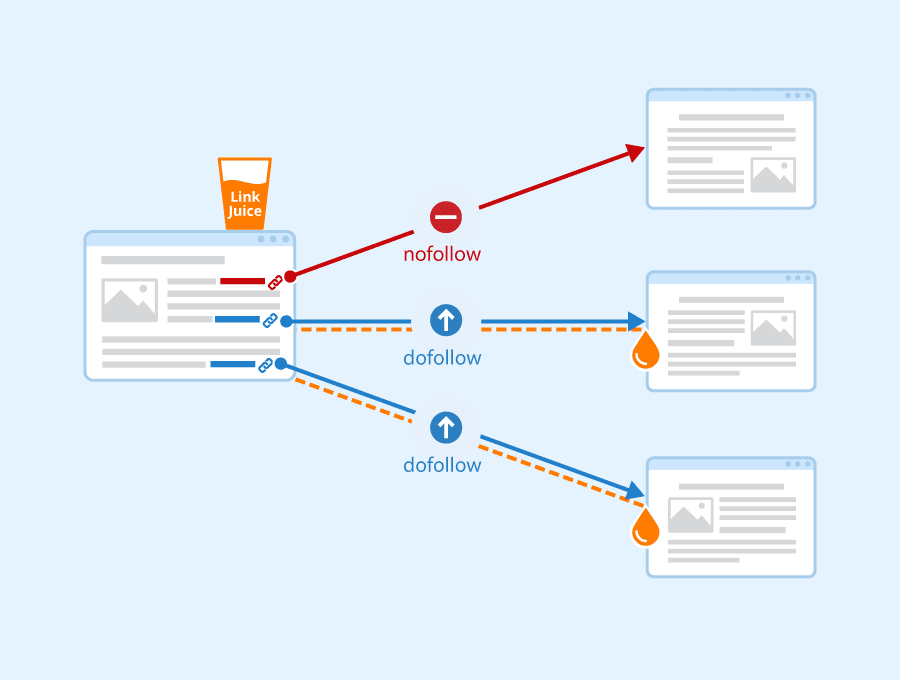
Social media profile creation establishes your brand presence across platforms where millions of users and numerous search engine crawlers actively operate. Complete profiles on relevant platforms—Facebook, Twitter, LinkedIn, Instagram, Pinterest depending on your industry—provide immediate external references to your website. These profiles typically get indexed quickly themselves while passing link equity and referral traffic to your new site.
Business directory listings in established directories like Yelp, Yellow Pages, or industry-specific directories create authoritative citations. These listings provide backlinks, establish NAP (Name, Address, Phone) consistency for local businesses, and generate referral traffic. Many directories have high domain authority and get crawled frequently, making links from these sources particularly valuable for jumpstart purposes.
Press release distribution through services like PRWeb or industry-specific platforms creates immediate external content mentioning your launch. While press releases shouldn’t be your only or primary link building tactic, they serve jumpstart purposes well by generating multiple online mentions simultaneously. Focus on genuinely newsworthy angles—innovative services, unique approaches, or interesting founder stories—rather than purely promotional content.
Guest posting opportunities on established blogs in your industry provide quality backlinks while demonstrating expertise. Reach out to relevant sites offering valuable content contributions rather than generic posts. A single guest post on a well-trafficked industry blog can accelerate discovery significantly while establishing relationships that benefit your long-term marketing strategy.
Monitoring Indexing Progress
Search Console Monitoring
Coverage report analysis provides comprehensive visibility into indexing status across your entire site. This report categorizes pages as indexed successfully, excluded for various reasons, or encountering errors preventing indexing. Regular monitoring helps identify problems quickly—if important pages appear in the excluded category, you can investigate and address issues before they become entrenched problems.
Index status tracking through Search Console shows how many pages Google has discovered and indexed over time. For new sites, watching this number climb from zero to encompassing your full site confirms your jumpstart succeeded. The graph visualization makes trends obvious—steady upward trajectory indicates healthy indexing progress, while flat lines suggest problems requiring attention.
Performance data interpretation reveals when indexed pages begin appearing in search results and generating impressions. Initially, you’ll see minimal data, but as indexing completes and pages begin ranking, performance metrics populate with queries, impressions, clicks, and positions. This data confirms not just indexing but actual search visibility.
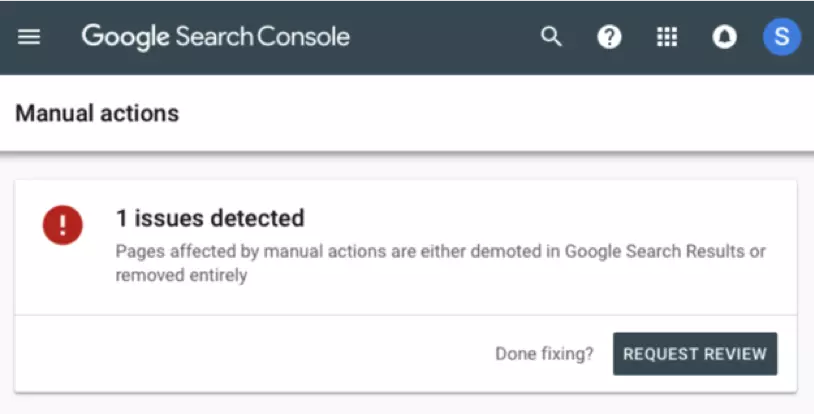
Issue identification and fixes become possible through detailed error reporting. Search Console flags specific problems like 404 errors, server errors, redirect chains, or mobile usability issues. Addressing flagged issues promptly demonstrates site quality and responsiveness, potentially improving crawl budget allocation and indexing priority for remaining pages.
Manual Search Checks
Site operator searches provide quick verification of indexing status. Searching “site:yourdomain.com” in Google returns all indexed pages from your domain. When launching, this search initially returns zero results, then gradually populates as indexing progresses. You can also check specific URLs with “site:yourdomain.com/specific-page” to verify individual page indexing.
Branded search monitoring tracks when your brand name begins appearing in search results. Initially, branded searches might return nothing or irrelevant results. As indexing progresses and you build brand signals, branded searches should display your homepage and key pages prominently. This progression indicates successful indexing plus growing brand recognition.
Specific URL checking involves directly searching for unique content from your pages. Copy a distinctive sentence from your content and search for it in quotes. If Google returns your page, it’s indexed. If not, indexing hasn’t completed or the page faces quality concerns. This technique works particularly well for verifying indexing of specific blog posts or product pages.
Cache date verification shows when Google last crawled your pages. Click the three dots next to search results and select “Cached” to see Google’s stored version with a timestamp indicating last crawl date. Fresh cache dates confirm regular crawling, while stale dates might indicate crawl frequency problems worth investigating.
Common Indexing Problems and Solutions
Pages Not Indexing
Robots.txt blocking issues represent one of the most common and frustrating indexing barriers. During development, sites often block all crawlers to prevent indexing of unfinished content. If you forget to remove these blocks before launch, search engines obey your robots.txt directives and never index your site. Always verify your robots.txt file allows crawling of important content, typically with “User-agent: * \n Allow: /” for full access.
Noindex tag problems similarly prevent indexing when meta robots tags or HTTP headers tell search engines not to index pages. Check page source code and HTTP headers ensuring you haven’t left noindex directives from development. These tags often hide in template files or CMS settings, requiring thorough investigation if indexing stalls unexpectedly.
Canonicalization errors occur when canonical tags point to wrong URLs or create loops that confuse search engines about which version to index. Verify that canonical tags on each page either self-reference or point to appropriate preferred versions. Avoid canonical chains where Page A canonicalizes to Page B which canonicalizes to Page C—this creates ambiguity that can prevent indexing.
Duplicate content concerns arise when substantial portions of your content appear elsewhere online or across multiple pages on your site. While Google doesn’t “penalize” duplicate content in most cases, it does choose canonical versions to index while ignoring duplicates. If your content duplicates existing material, search engines might index the original source instead of your version.
Low-quality content flags prevent pages from indexing when algorithms determine content provides insufficient value to merit index inclusion. Extremely thin pages with minimal text, pages dominated by ads over content, or pages that simply aggregate content from elsewhere without adding value may be crawled but never indexed. Focus on substantial, original content that genuinely helps users.
Conclusion
Successfully implementing a search engine jumpstart strategy dramatically reduces the frustrating waiting period between launching your website and achieving meaningful search visibility. The techniques outlined here—from technical preparation and immediate submissions to external signal creation and diligent monitoring—work synergistically to accelerate discovery without resorting to manipulative tactics that could damage long-term prospects.
Remember that jumpstarting gets you indexed quickly, but sustainable success requires ongoing commitment to quality content, technical excellence, and genuine value creation. The initial indexing represents just the beginning of your SEO journey rather than the destination. Once search engines discover and index your site, your focus shifts to building authority, earning quality backlinks, creating exceptional content, and optimizing for competitive keywords.
Start your jumpstart by verifying technical foundations are solid, then immediately submit sitemaps through Search Console and Bing Webmaster Tools. Create initial external signals through social profiles and business listings while monitoring indexing progress daily during the first few weeks. Most sites following these strategies achieve substantial indexing within 7-14 days, with high-priority pages often indexed within 24-48 hours of manual submission.
Ready to launch your site and achieve rapid search visibility? Implement these jumpstart strategies today, beginning with Search Console setup and sitemap submission. Track your progress through the monitoring techniques described here, address any issues promptly, and watch as your new website transitions from invisible to discoverable in a fraction of the time traditional passive approaches require.
