

Publishing unique, valuable content represents a cornerstone of effective search engine optimization. However, many website owners unknowingly create situations where identical or substantially similar content appears across multiple URLs. This phenomenon, known as duplicate content, creates confusion for search engines attempting to determine which version deserves ranking, often resulting in diminished visibility for all versions. Understanding how duplication occurs, why it matters, and most importantly, how to resolve it becomes essential for maintaining strong organic search performance.
The challenge extends beyond deliberately copying content from other websites. Technical configurations, content management system limitations, and common website features frequently generate unintentional duplication that most site owners never realize exists. Your e-commerce site might display the same product description across multiple URLs with different tracking parameters. Your blog posts might appear in category archives, tag pages, and date-based archives, creating several URLs showing identical content. Your homepage might be accessible through multiple URL variations that search engines treat as separate pages with duplicate content.
Search engines don’t want to show users the same information repeatedly in search results. When Google discovers multiple pages containing substantially similar content, it attempts to identify the most relevant version for each query while filtering out duplicates. This selection process often doesn’t align with your preferences—the wrong version might rank, all versions might receive reduced visibility, or in some cases, none of your pages rank as well as they could if duplication didn’t exist. Understanding these dynamics helps you proactively manage content to ensure search engines index and rank your preferred versions.
This comprehensive guide reveals everything you need to know about SEO duplicate content—what causes it, how to detect it, proven solutions for resolving issues, and prevention strategies that eliminate duplication before it impacts your rankings. Whether you’re dealing with existing duplication problems or implementing preventive measures during website development, these insights will help you maintain clean, search-engine-friendly content architecture that maximizes your organic visibility.
Understanding SEO Duplicate Content
Duplicate content refers to substantive blocks of content within or across domains that either completely match other content or are appreciably similar. This definition encompasses exact copies where every word matches identically and also near-duplicates where the content is substantially the same despite minor differences like changed word order or small additions. Search engines employ sophisticated algorithms to identify both exact matches and near-duplicates, treating them similarly in their ranking processes.
The distinction between internal and external duplication matters significantly. Internal duplicate content occurs when multiple pages on your own website contain the same or very similar content. External duplication happens when content from your site appears on other domains or vice versa. While both types create problems, they require different approaches to resolve. Internal duplication typically results from technical issues you can control directly, while external duplication involves content syndication, scraping, or plagiarism requiring different strategies.
How search engines handle duplicate content involves several steps. When crawlers discover multiple URLs with identical or very similar content, they attempt to group these duplicates together and select what they consider the best version to include in search results. This canonicalization process doesn’t always choose the version you prefer. The selected URL receives indexing priority and ranking opportunities, while other versions get filtered from results. This creates potential traffic loss if search engines select URLs you didn’t intend as your primary versions.
Common misconceptions about SEO duplicate content cause unnecessary worry and sometimes misguided remediation efforts. The most persistent myth claims Google penalizes websites for duplicate content. In reality, Google doesn’t impose penalties for most duplication—instead, it filters duplicate versions from results to improve user experience. However, the filtering effect can dramatically reduce visibility, which feels like a penalty even though technically it isn’t. The distinction matters because different problems require different solutions.
Another misconception suggests that any content similarity constitutes problematic duplication. In practice, minor similarities, standardized disclaimers, product specifications, or other necessarily repeated elements don’t typically cause issues. Search engines focus on substantive duplication affecting the main content portions of pages rather than incidental similarities in navigation, footers, or sidebar content that naturally repeats across sites.
Common Causes of SEO Duplicate Content
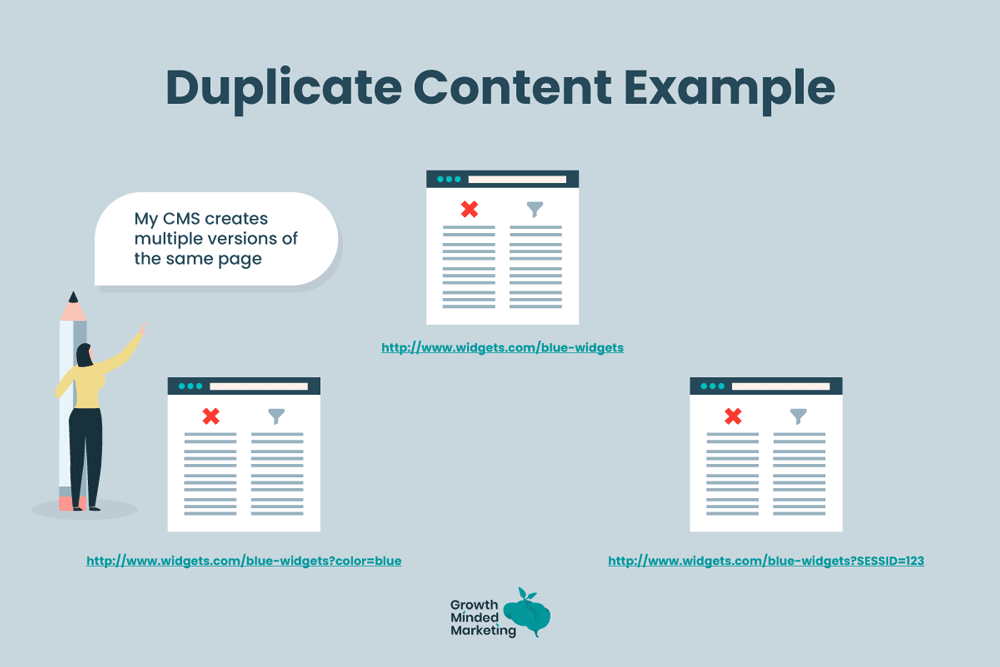
URL parameters represent one of the most frequent technical causes of unintentional duplication. E-commerce sites often use parameters for sorting (price-low-to-high), filtering (by color or size), or tracking (campaign sources). Each parameter combination creates a unique URL that displays essentially the same content: example.com/products and example.com/products?sort=price both show your product category page with identical content except for display order. Search engines might treat these as separate pages, creating duplication issues.
Session IDs embedded in URLs create extreme duplication scenarios where every visitor generates unique URLs for the same content. Older content management systems and some web applications still create URLs like example.com/page?sessionid=12345, with that session identifier changing for each user. If search engines crawl these session-based URLs, they encounter what appear to be thousands of duplicate pages—all showing identical content with different session parameters.
HTTP versus HTTPS protocol differences cause duplication when websites maintain accessible versions at both http://example.com and https://example.com. While HTTPS has become standard, improper migration leaves HTTP versions accessible, creating exact duplicate content across two protocols. Similarly, WWW versus non-WWW versions (www.example.com vs. example.com) create duplication when both resolve successfully rather than one redirecting to the other.
Print versions and mobile-specific URLs generate duplication when sites create separate URLs for printer-friendly pages or mobile-optimized content. Pages like example.com/article and example.com/article/print might contain identical content formatted differently for display contexts. Similarly, m.example.com might duplicate content found on www.example.com, creating cross-subdomain duplication issues.
Product variations in e-commerce create challenging duplication scenarios. A t-shirt available in five colors might have separate URLs for each color variation, with identical descriptions except for the color mentioned. Search engines might view these as near-duplicates despite representing legitimately different products. Balancing user experience benefits of separate variation pages against duplication concerns requires careful implementation.
Scraped and syndicated content creates external duplication when your content appears on other domains. Content syndication partnerships, RSS feed scraping, or outright plagiarism can result in your content appearing on multiple sites. While you’re the original source, search engines don’t always recognize this, potentially ranking other sites’ copies above your original content.
How to Find SEO Duplicate Content
Google Search Console provides the most authoritative tool for identifying how Google perceives duplication on your site. The Coverage report shows indexed pages and those excluded from indexing, often citing “Duplicate, submitted URL not selected as canonical” or “Duplicate without user-selected canonical” as reasons for exclusion. These notifications directly indicate which URLs Google considers duplicates and which versions it prefers.
The Page Indexing report within Search Console reveals deeper insights into canonicalization. When Google indexes a page, it shows both the user-declared canonical (your preference) and Google-selected canonical (what Google chose). Discrepancies between these indicate situations where Google overrode your preference, often due to duplicate content concerns. Reviewing these discrepancies helps identify which pages Google views as duplicates.
Site: operator searches in Google provide quick manual checks for obvious duplication. Searching “site:example.com ‘unique content phrase'” shows all indexed pages containing that specific text. If you find multiple URLs in results, you’ve discovered indexed duplicates. This technique works particularly well for checking whether scrapers have republished your content on their domains by searching for distinctive phrases without the site: operator.
Specialized duplicate content checker tools scan your website and identify pages with high content similarity. Tools like Siteliner, Screaming Frog SEO Spider, and Sitebulb crawl your site and compare page content, highlighting duplicates with similarity percentages. These tools excel at internal duplication detection, showing exactly which pages share content and how much overlap exists.
Plagiarism detection services like Copyscape help identify external duplication by searching the web for pages containing your content. While primarily designed for detecting plagiarism, these tools effectively reveal where your content appears on other domains. Regular monitoring catches scrapers and unauthorized content republication that might outrank your original versions.
Manual auditing through careful site review identifies patterns that automated tools miss. Review URL structures looking for parameter-based duplication, check whether protocol and subdomain variations resolve properly, and examine product categories or archives for repeated content. This human analysis complements automated detection by identifying systemic issues creating duplication rather than just finding individual duplicate pages.
Solutions and Fixes for SEO Duplicate Content
Canonical tags represent the primary solution for indicating your preferred version when duplication exists. The rel=”canonical” link element tells search engines which URL you consider authoritative for specific content. Implementing <link rel=”canonical” href=”https://example.com/preferred-url”> on duplicate pages consolidates ranking signals to your chosen version. Canonical tags don’t guarantee search engines will honor your preference but significantly increase the likelihood.
Proper canonical implementation requires placing tags on all duplicate versions pointing to the preferred URL. The canonical URL should also self-reference its canonical, creating consistency. Avoid common mistakes like canonicalizing to non-existent URLs, creating canonical chains (A canonicalizes to B, which canonicalizes to C), or using relative URLs when absolute URLs provide clarity.
301 redirects solve duplication when you don’t need duplicate versions accessible. Unlike canonical tags that keep duplicates accessible while signaling preference, 301 redirects remove duplicate URLs entirely by permanently forwarding visitors and search engines to the preferred version. This approach works perfectly for consolidating HTTP to HTTPS, WWW to non-WWW, or eliminating obsolete URL variations.
Implementing redirects at scale requires server configuration or .htaccess rules rather than page-by-page redirects. For example, redirecting all HTTP URLs to HTTPS versions requires a single rule catching all URLs rather than individual redirects for each page. Similarly, WWW to non-WWW consolidation benefits from server-level implementation ensuring consistent behavior across your entire site.
Robots.txt blocking prevents search engines from crawling URLs you never want indexed. While not solving existing duplication, robots.txt prevents future indexing of problematic URLs like parameter-based variations, session IDs, or printer-friendly versions. Add Disallow rules for URL patterns creating duplication: Disallow: /*?sessionid= blocks all URLs containing session ID parameters.
Meta noindex tags remove pages from search indexes when you need content accessible to users but not search engines. Unlike robots.txt which prevents crawling, noindex allows crawling but blocks indexing. This distinction matters—search engines need to crawl pages to read noindex directives. Noindex works well for internal search results, filtered product views, or other user-facing pages that shouldn’t appear in search results.
URL parameter handling in Google Search Console helps manage parameter-based duplication by telling Google which parameters don’t change content. Configure parameters as “Doesn’t affect page content” for tracking parameters or “Narrows” for filters, helping Google understand which URLs to treat as duplicates. While not a perfect solution, parameter handling reduces likelihood of parameter-generated duplication causing problems.

Prevention Strategies for SEO Duplicate Content
Content creation best practices start with producing genuinely unique content rather than republishing or minimally modifying existing material. When covering similar topics across multiple pages, ensure each provides distinct value and perspective. Write unique product descriptions even for similar items rather than using manufacturer content or copying descriptions across variations. Invest in original research, examples, and insights that differentiate your content from competitors and from other pages on your own site.
Technical implementation during website development prevents many duplication issues before they arise. Choose URL structures avoiding parameters when possible—use /products/category/item rather than /products?category=x&item=y. Implement proper protocol and subdomain canonicalization from launch, ensuring only your preferred version (HTTPS, with or without WWW) resolves while alternatives redirect. Configure your CMS to prevent creating multiple URLs for identical content like pagination, print versions, or tag archives.
Content management system configuration significantly impacts duplication likelihood. WordPress, for example, can create the same post accessible via category archives, tag archives, author archives, and date-based archives—five URLs showing identical content. Configure your CMS to implement appropriate canonical tags, noindex certain archive types, or restrict content to appearing in limited contexts. Review your platform’s SEO settings and plugins ensuring duplication-preventing features activate properly.
Monitoring systems catch new duplication as it develops rather than discovering problems after rankings suffer. Set up Google Search Console email alerts notifying you of new indexing issues including duplicate content. Schedule regular site audits using tools like Screaming Frog identifying new duplication patterns. Monitor for external duplication through plagiarism checkers ensuring scrapers aren’t republishing your content. Early detection enables quick remediation before significant ranking impact occurs.
Creating internal policies about content reuse prevents well-meaning team members from creating duplication. Establish guidelines that regional sites must substantially rewrite headquarters content rather than copying it verbatim. Require unique product descriptions for all variations rather than copying with minor changes. Document approved approaches for situations where content similarity is unavoidable, ensuring consistent implementation of canonical tags or other solutions.
Conclusion
Managing SEO duplicate content requires understanding that duplication frequently emerges from legitimate business needs and technical realities rather than deliberate attempts to manipulate search engines. E-commerce sites need product variations, tracking parameters, and user filtering. Content sites create archives, categories, and tags for navigation. Mobile users might benefit from separate mobile-optimized URLs. The challenge isn’t eliminating these features but implementing them in ways that prevent negative search engine consequences.
Successful duplication management balances user experience with search engine requirements. The solutions discussed here—canonical tags, redirects, robots.txt, and noindex tags—provide tools for maintaining useful site features while directing search engines toward preferred versions. No single solution works for every situation. Analyze your specific duplication causes, understand the tradeoffs of different approaches, and implement combinations of techniques addressing your unique circumstances.
Regular monitoring and maintenance ensure duplication doesn’t creep back into your site. New features, platform updates, or simple configuration mistakes can reintroduce duplication you’ve previously resolved. Quarterly audits identifying new duplication patterns, reviewing Google Search Console reports, and checking for external content theft maintain the clean content architecture that supports strong organic search performance.Ready to eliminate duplicate content issues holding back your rankings? Start by running a comprehensive site audit identifying current duplication, prioritize fixes based on traffic potential, implement appropriate solutions systematically, and establish monitoring ensuring problems don’t return. Clean content architecture pays dividends through improved rankings, increased traffic, and better user experiences across your site.
